
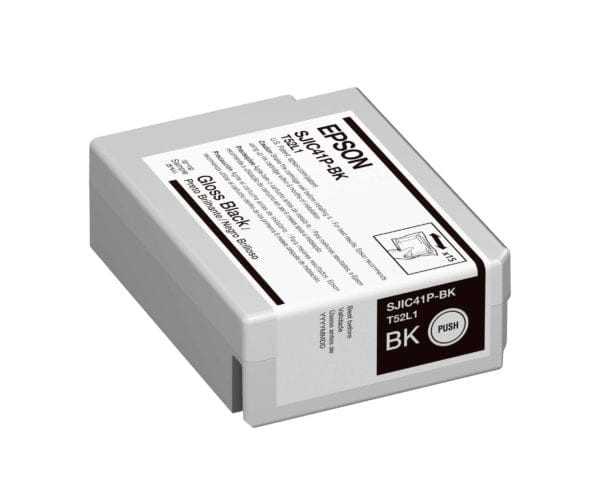
Epson CW-C4000 Gloss Black Ink Cartridge, SJIC41P(BK)
- $54.00
- $54.00
- Unit price
- per


Epson SJIC41P-BK High Yield Gloss Black Ink Cartridge (C13T52L120) for CW-C4000
Genuine Epson UltraChrome DL pigment ink for the ColorWorks CW-C4000 Gloss printer. If you are comparing ink pack price in the United States or double-checking what is compatible with CW-C4000 gloss media workflows, we can verify the exact black option before you order.
Correct black for gloss media
Gloss black is intended for the CW-C4000 Gloss configuration, aligned to glossy label finishes.
Exact cartridge ID
SJIC41P-BK gloss black, Epson SKU C13T52L120, part of the CW-C4000 ink set.
Smarter reordering
We help you plan consumption by label size and coverage so black does not become your bottleneck.
Why teams choose Epson SJIC41P-BK (C13T52L120)
The value punch
- Genuine Epson cartridge matched to CW-C4000 Gloss ink architecture.
- Pigment ink designed for durable labels on compatible glossy media.
- Cleaner output when media and black type are correctly matched.
- Reliable replenishment: build a simple CMYK reorder plan for steady production.
- Fast verification support if you are unsure between matte black and gloss black.
Best-fit industries
- Food and beverage packaging with glossy label finishes
- Cosmetics and personal care (premium shelf look)
- Beverage and refrigerated applications (with the right media)
- Retail product labeling where deep blacks matter
- Warehousing color labels that need sharp contrast
Confident blacks on gloss
Gloss black helps maintain strong contrast on glossy label finishes in CW-C4000 Gloss setups.
Match media to results
We help you align label finish, printer configuration, and settings for consistent durability.
the United States-first guidance
If you need the right cartridge quickly in the United States, send your CW-C4000 model and label finish.
Specifications
| Product | Genuine Epson ink cartridge, SJIC41P-BK (Gloss Black) |
|---|---|
| Epson SKU | C13T52L120 |
| Ink family | UltraChrome DL pigment ink |
| Color | Gloss Black (BK) |
| Cartridge size | 50 mL |
| Compatible printer | Epson ColorWorks CW-C4000 Color Inkjet Label Printer (Gloss) |
| Notes on yield | Ink yield varies by label size, coverage, settings, and maintenance cycles. For accurate planning, share your typical label dimensions and artwork coverage. |
If your CW-C4000 is the Matte configuration, you likely need the matte black cartridge instead of gloss black. If unsure, message us and we will confirm in minutes.
Compatible printers and support
C13T52L120 is the gloss black cartridge for the CW-C4000 Gloss printer workflow. The most common mismatch is ordering the wrong black type, so we verify your printer configuration and label finish to keep output consistent.
How we help with the supply side
- Confirm your CW-C4000 configuration and the correct black option for your label finish.
- Help you pair media and settings for durability and scuff resistance.
- Build a CMYK reorder plan so one color does not halt production.
- Support quality checks when you change label material or environment.
What to tell us for a fast compatibility check
- Your printer model: CW-C4000 Gloss (or confirm if matte)
- Label material and finish: paper or synthetic, matte or gloss
- Application: indoor, refrigerated, outdoor, moisture exposure
- Label size and typical coverage (light coverage vs heavy solid fills)
- Any durability goals (rub resistance, condensation, chemical exposure)
For the fastest help, message us "C13T52L120" plus your CW-C4000 model and your label finish.
FAQ
Gloss black vs matte black, which one do I need for CW-C4000?
What is the C13T52L120 ink cartridge price in the United States?
Is C13T52L120 compatible with all CW-C4000 printers?
How many labels will this gloss black cartridge print and what is the running cost?
Do you supply compatible supplies in the United States for CW-C4000 workflows?
Want to confirm gloss black is the right match?
Send your CW-C4000 model (gloss or matte) and label finish. We will confirm the correct black option and help you plan CMYK reorders.
U.S. ordering for Epson CW-C4000 Gloss Black Ink Cartridge, SJIC41P(BK)
Prices are shown in USD. U.S. orders are dispatched from ForeFront's Canadian fulfillment location. Available shipping services and any import charges collected by ForeFront are displayed at checkout. Government or carrier charges not collected at checkout may still apply.
Confirm the printer model and consumable part number before ordering. Our team can review compatibility and related supplies for your workflow.
Related Products
- $54.00
- $54.00
- Unit price
- per
- $54.00
- $54.00
- Unit price
- per
- $54.00
- $54.00
- Unit price
- per
- $54.00
- $54.00
- Unit price
- per
- $54.00
- $54.00
- Unit price
- per
- $54.00
- $54.00
- Unit price
- per
- $54.00
- $54.00
- Unit price
- per
- $54.00
- $54.00
- Unit price
- per
- $54.00
- $54.00
- Unit price
- per
- $54.00
- $54.00
- Unit price
- per


